Detailed guides from basic operations to advanced features.
Exporting and Importing Tasks
Repsona allows you to export and import tasks in CSV format and Gantt-san format. It also supports exporting in XLSX and PDF formats.
| Who can use this feature | Plans that can use this feature |
|---|---|
| Everyone | All plans |
Export and Import from Submenu
You can export and import from the submenu on the task list or Gantt chart screen.

↑ Submenu button
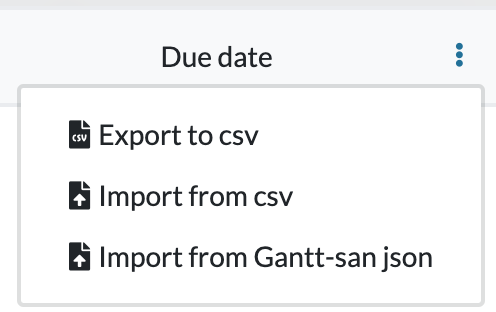
Exporting
You can export in CSV, Gantt-san JSON, XLSX, and PDF formats.
CSV Export
Select "CSV Export" to export in CSV format. This format uses a CSV layout that can be imported back into Repsona.
Gantt-san Export
Select "Gantt-san Export" to export in Gantt-san JSON format. This format can be imported and used in Gantt-san.
Free Gantt chart tool available to everyone without login
XLSX Export
Select "XLSX Export" to export in a format that can be opened in Excel.
PDF Export
Select "PDF Export" to export in a print-friendly format.
Importing
You can import CSV and Gantt-san JSON formats.
CSV Import
Select "CSV Import" to import CSV format files.
| Column | Field Name | Description | Example |
|---|---|---|---|
| id | ID | A unique ID to identify the task. Can be any string. | 1 |
| name | Task Name | Name of the task | Agree budget |
| description | Description | Description of the task | It involves organizing estimated costs, breakdowns, and budget limits, then sharing them with relevant teams and decision-makers.If needed, adjustment options are proposed and final approval is secured. |
| responsibleUser | Assignee | Specify the username of the assignee. Must be a member in the space. | Reon |
| ballHoldingUser | Ball Holder | Specify the username of the ball holder. Must be a member in the space. | Seb |
| startDate | Start Date | Specify in YYYY-MM-DD format. | 2024-01-01 |
| dueDate | Due Date | Specify in YYYY-MM-DD format. | 2024-12-31 |
| status | Status | Specify the task status. Must exist in the project. | Doing |
| milestone | Milestone | Specify the task milestone. Must exist in the project. | v1.37.0 |
| parent | Parent ID | Specify the parent task ID. Use the ID specified in task ID. | 4 |
| tags | Tags | Specify tags separated by commas. | tag1,tag2 |
| planned | Planned | Specify planned work hours etc. Free unit. | 5 |
| actual | Actual | Specify actual work hours etc. Free unit. | 5 |
| sortOrder | Sort Order | Specify display order when importing list. Smaller values are displayed at the top. | 1 |
Gantt-san Import
Select "Gantt-san Import" to import Gantt-san JSON format. You can import files exported from Gantt-san into Repsona.
For data migration from Gantt-san to Repsona, please see here