---
title: Migrate data from Gantt-san to Repsona
categoryId: other
subCategoryId: Useful information
---
This guide explains how to migrate data from Gantt-san to Repsona.
## What is Gantt-san?
[Free Gantt Chart — No Sign-up, No Login](https://repsona.com/lp/free-gantt) is an online Gantt chart service that you can use completely free—no account registration, login, or download required.
## Export JSON from Gantt-san
You can export Gantt-san charts in JSON format. Click the "Export" button at the top of the Gantt-san screen to download the file.
## Before importing
Repsona manages data in a different format from Gantt-san. Set up statuses and members in Repsona in advance.
### Create statuses
Create in Repsona the statuses you want to import, using the same names as in Gantt-san.
[Set status names and order](/help/articles/002008000-status)
### Invite members
Invite or create members in Repsona beforehand, using the same names as in Gantt-san. You can also register by name only (create a no-login member).
[Invite your teammates to Repsona](/help/articles/001004000-invite)
## Import Gantt-san JSON into Repsona
Select the project in Repsona where you want to import the data. Open the project’s "Task list" submenu.
 *↑ submenu button*
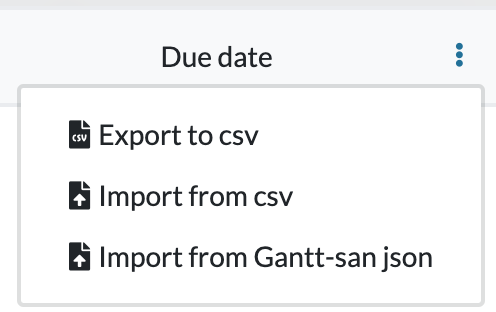 Select "Import from Gantt-san JSON" and upload the JSON file to import the data.